
Architecture · RADOS storage (reference) · Operations · Observability
This guide is for operators who are about to run ShardPost, or have just started to. It explains what ShardPost stores in Ceph, how and why, and builds the picture up from the basics: Ceph first, then the pools, then one account, then what happens when mail arrives, and finally what an operator does, watches and decides. Each chapter ends with a short summary; when you need the last detail, the chapter links to the reference document that has it.
Written for ShardPost 0.52.0 on 2026-10-04. Object names, keys,
commands, configuration keys and defaults were checked against the code
of that version (internal/cephstore, internal/config,
internal/jobs, internal/metrics, cmd/shardpost,
cmd/shardpostctl). The examples use the made-up accounts
alice@example.org and bob@example.org.
How to read it. Chapters 1 to 3 build the picture: what Ceph is, how ShardPost divides it, what one account looks like. Chapter 4 follows a mail through the system. Chapters 5 and 6 explain how many servers work together. Chapters 7 to 10 are for the operator: the programs, the daily work, monitoring and sizing. Chapter 11 is a glossary for the terms used throughout.
Contents
- Ceph in five minutes
- The pools of ShardPost and why there are three
- What one account looks like in RADOS
- Walkthroughs: what happens, step by step
- Many servers, no central database
- The store-wide state
- Our programs and what they do to Ceph
- The operator's job
- Monitoring
- Sizing rules of thumb
- Glossary
- Where to read more
1. Ceph in five minutes
This chapter covers what a Ceph cluster is made of, how an object finds its disk, the difference between replication and erasure coding, what an object holds (data, xattrs, omap), and what RADOS, librados and cephx are.
1.1 A warehouse with many shelves
Think of Ceph as a large warehouse.
- An OSD (object storage daemon) is one shelf with its own clerk: one process per disk that stores data and answers requests. A cluster has a few to hundreds of them.
- The monitors are the front office. They keep the floor plan of the warehouse (the cluster map: which OSDs exist, which are up) and check the ID cards of everybody who comes in (cephx, below). They do not carry boxes.
- A pool is a department with its own rules: how many copies of each box, which kind of shelf (fast NVMe or large HDD).
- An object is one labelled box. It has a name, like
mbox/7f3a…ormsg/9c1e…/0. - A namespace is a label prefix inside a pool. Two boxes with the same name in different namespaces are different boxes. ShardPost gives every account its own namespace. A namespace organizes data; it is not a separate set of credentials (the server's Ceph user reaches all of them, see storage.md).
- A placement group (PG) is a numbered group of boxes. Ceph does not track every box individually; it hashes the box's name to a PG, and places whole PGs onto OSDs.
1.2 How an object finds its disk

- The client logs in at a monitor and fetches the cluster map.
- It hashes the object name and gets a PG number.
- An algorithm called CRUSH computes, from the map, which OSDs hold that PG. Everybody computes the same answer; nobody has to ask.
- The client talks to the first OSD of the set (the primary) directly. There is no gateway in the middle.
- For a write, the primary forwards it to the other OSDs of the set and confirms only when they have it.
Two consequences matter for ShardPost:
- There is no central lookup. Ten servers can work on the same cluster without asking each other where things are.
- Listing a namespace is expensive. Because objects are placed by a hash, the objects of one namespace are spread over every PG of the pool. To list them, Ceph has to visit every PG. That is why ShardPost avoids listings in its everyday paths (chapter 5 and 6).
1.3 Replication and erasure coding

A pool keeps its data safe in one of two ways:
- Replicated (for example
size 3): every object is stored three times on three OSDs. Simple and fast; costs three times the space.min_size 2means writes continue while one copy is missing. - Erasure coded (EC, for example
k=2 m=1or4+2): an object is cut intokdata parts plusmparity parts, each on another OSD. Anykparts rebuild the object. Costs(k+m)/kthe space — 1.5 for 2+1 and 4+2 — but writes are more expensive, and an EC pool cannot hold omap (below).
1.4 What is inside an object
Every RADOS object can hold three things:
| Part | What it is | ShardPost example |
|---|---|---|
| Data | a byte stream, read and written by offset | the bytes of a message chunk msg/<guid>/<n> |
| xattrs | a few small named values | refs (reference count) and len (total size) on chunk 0 of a message |
| omap | a sorted key-value store attached to the object, kept in the OSD's RocksDB database | the entries m:<uid> of a mailbox object |
The omap is the important one for ShardPost: almost all of its
index — mailboxes, message entries, quota counters, the full-text
index — lives in omap keys. Omap can be read by key, by range (all keys
from m:0000000100 on) and page by page.
Large omap warning. Ceph warns when one object has more than
200 000 omap keys (osd_deep_scrub_large_omap_object_key_threshold, a
Ceph default; ShardPost's docs and configuration use this value
throughout). The check runs during a deep scrub, so the warning
LARGE_OMAP_OBJECTS can appear days after the object grew. Much of
ShardPost's design is about keeping every object well below this line.
1.5 RADOS, librados, cephx
- RADOS is the object store at the bottom of Ceph: pools, objects,
OSDs. ShardPost uses RADOS directly. It does not use the block
device (RBD), the file system (CephFS) or the S3 gateway (RGW). The
Rook manifests create the pools as
CephBlockPoolresources, but they are used as plain RADOS pools. - librados is the client library. The
shardpostbinary links it (that is why it needs cgo and a matchinglibrados2, see Running without Kubernetes). - cephx is Ceph's authentication. ShardPost logs in as one Ceph user
(
ceph.user, defaultshardpost) with read, write and execute rights on its pools. "Execute" is needed for object classes: small programs that run inside the OSD, likecls_lockfor locks.
Three more RADOS features ShardPost relies on, explained in chapter 5:
- every object has a version that changes with each write; a write can say "only if the version is still N" (assert version);
- watch/notify: a client can watch an object and is woken when somebody notifies it;
- one object, one atomic step: several changes to one object in one operation either all happen or none. There is no transaction across two objects.
In short. Ceph is a warehouse of OSDs, organized in pools; objects are hashed to PGs and PGs are placed on OSDs by CRUSH, so clients go straight to the right disk. Replicated pools can hold omap, erasure coded pools cannot. An object holds data, xattrs and omap; ShardPost keeps its index in omap and its message bytes in data. Changes are atomic per object, never across objects. Listings are expensive.
2. The pools of ShardPost and why there are three
This chapter covers which pools ShardPost uses, what goes where and why, which namespaces exist, and how the cluster knows whether the store-wide state lives in its own pool.
2.1 Three pools

| Pool (default name) | Configuration key | Holds | Type |
|---|---|---|---|
shardpost-index |
ceph.index_pool |
the accounts' index objects (omap): mailboxes, entries, quota, full-text index, Sieve scripts (the users' filter rules) | replicated |
shardpost-data |
ceph.data_pool |
message blobs (msg/<guid>/<n>) and the learning copies |
erasure coded or replicated |
none; shardpost-system in the examples |
ceph.system_pool (empty by default: no system pool) |
the store-wide state: admin store, account directory, queues, locks, server METADATA | replicated |
Why split it like this?
- Index and data behave differently. The index is many small keys,
read and rewritten all the time; it needs omap, so it must be
replicated, and it likes fast disks. Message bytes are large, written
once and never changed; they can live on large disks in an erasure
coded pool, which saves space. A blob is never overwritten, so the data
pool does not even need
allow_ec_overwrites(Ceph side). - The store-wide state is small and hot. A few hundred objects that
every server polls, watches or locks (job queues, worker locks, the
auth flush log). With
ceph.system_poolit gets a replicated pool of its own on fast OSDs, apart from the millions of account objects. The operations guide estimates well under 5 GB for it at a million accounts (Pool sizes).
The default chunk size of message blobs is 4 MiB (ceph.chunk_size).
Do not change it casually while data exists: readers compute chunk
offsets from it (storage.md).
2.2 The namespaces
Inside the pools, the namespace says whose data it is:
| Namespace | Pool(s) | What |
|---|---|---|
the canonical account name, e.g. alice@example.org |
index and data | everything of one account |
~public |
index and data | the public folders (they belong to no account) |
~admin |
system (or index) | the admin store: jobs, plans, marks, registrations, push and submission state, the auth flush log |
~accounts |
system (or index) | the account directory and the store-wide queues |
~learning |
system (or index) for the queue indexes, data for the copies | the IMAPSieve learning queue |
~server |
system (or index) | the server METADATA entries |
Names starting with ~ are reserved. The store refuses to open an
account with an empty name or a reserved name other than these five
(Store.User, see storage.md).
2.3 The old layout: no system pool
Before 0.47.0 — and today on every cluster whose ceph.system_pool is
empty — the four system namespaces live in the index pool. Nothing
else changes; the objects have the same names. The system pool is an
optimization for large clusters, not a requirement.
A cluster has exactly one placement, and the data says which, not the configuration:
- the fence
system.movedin~adminof the index pool says "the state has moved, and to which pool"; - the mark
system.poolin~adminof the system pool says "this pool holds the state of that index pool and cluster".
Every shardpost process reads both when it opens the store (two reads,
no listing; the system tools and the bench check them on their own) and
refuses to start when they contradict its configuration.
Servers and push workers repeat the check every minute; a contradiction
ends the process after draining (event=system_placement_lost), a read
that fails only logs a warning. shardpost system init creates fence and
mark for a new cluster, shardpost system migrate moves an existing
cluster in a maintenance window (chapter 8). Details:
System pool and placement.
In short. Three pools: index (omap, replicated, fast), data (blobs,
usually erasure coded, large), system (store-wide state, replicated,
fast, optional). Each account is a namespace in index and data; the
store's own state uses four ~ namespaces. Without a system pool those
live in the index pool. A fence and a mark decide the placement, and
every process checks them.
3. What one account looks like in RADOS
This chapter covers every object of the account alice@example.org,
what its keys mean, how a message is found from a mailbox name, and how
big things can get.

3.1 The registry: mailboxes
Think of it as the account's table of contents. One omap object,
mailboxes, in the account's namespace of the index pool:
| Key | Meaning |
|---|---|
m:<name> |
a mailbox name, e.g. m:INBOX; the value is a record with the stable mailbox id |
q:bytes, q:msgs |
the quota usage of the account (bytes, messages) |
q:lbytes, q:lmsgs |
a quota limit set with SETQUOTA (the usual limit comes from the user database, see quota) |
uv:<name> |
the last UIDVALIDITY used for a name |
sub:<name> |
a subscription to a name without a mailbox |
d:… |
delivery intents of a delivery to several mailboxes |
bi:, qi:, bimp:, up:, sub:<guid>, ci:, dm:, ps: |
intents: notes "I am in the middle of something" (chapter 5) |
The mailbox name is only a key here. The mailbox's own objects are named by its id, so a RENAME changes one registry key and moves no data.
3.2 The mailbox: mbox/<id> and its shards
Each mailbox has one object mbox/<id>, called shard 0. It holds
the mailbox header and the first messages:
| Key | Meaning |
|---|---|
h:uidnext, h:uidvalidity, h:modseq |
the IMAP counters: next UID, UIDVALIDITY, highest MODSEQ |
h:keywords, h:recent, h:shardsize, h:logstart |
keywords in use, the \Recent mark, the shard size, the start of the change log |
m:<uid> |
one entry per message, the UID with ten digits (m:0000000042); the value is the message's index record: GUID, size, chunk count, flags, dates, envelope, preview |
c:<modseq>, v:<modseq> |
the change log and the log of vanished (expunged) UIDs, for CONDSTORE/QRESYNC |
i:…, r:<uid> |
MOVE intents and removal intents (chapter 4.3) |
A mailbox with many messages gets more objects: mbox/<id>/1,
mbox/<id>/2, … The rule is
shard = (uid - 1) / shard size
with the shard size from server.mbox_shard_size (default 100 000),
written into the header when the mailbox is created and fixed after
that. So UIDs 1–100 000 are in mbox/<id>, 100 001–200 000 in
mbox/<id>/1, and so on. No object ever holds more than 100 000 entries.
3.3 The messages: msg/<guid>/<n> in the data pool
Every stored message gets a GUID, 16 random bytes written as 32 hex digits. Its bytes go into the data pool, same namespace:
msg/<guid>/0— the first 4 MiB, plus the xattrsrefs(how many mailbox entries point at this blob) andlen(the total size);msg/<guid>/1,msg/<guid>/2, … — further 4 MiB chunks.
A 10 MiB message is three objects; a 5 KiB message is one. Blobs are
written once and never changed. COPY within the account adds an entry
and raises refs; it does not copy the bytes.
3.4 The account change log: account
JMAP (the JSON mail protocol of web and mobile clients) asks "what
changed anywhere in this account since state N?". The
object account answers it:
| Key | Meaning |
|---|---|
h:seq |
the account counter (the newest sequence) |
h:logstart |
the oldest sequence still in the log |
p:<seq> |
a change announced but not yet recorded |
a:<seq> |
a recorded change: kind, operation, mailbox, messages |
The log keeps server.account_log_retention entries (default 10 000).
JMAP push workers and IMAP NOTIFY watch this object.
3.5 The full-text index
Search would be far too slow if every SEARCH read every message. So
every delivery also writes a full-text index. Since 0.46.0 new indexes
use layout 3 (once the cluster mark fts/layout3 is set):
| Object | What |
|---|---|
ftsmap |
the id map: GUID ↔ document id (g:<guid>, i:<id>, n), the layout record L naming the current generation, the version marker V |
ftx/<gen>/p<i> |
posting lists: for each term (s:invoice = word "invoice" in the subject) the documents that contain it |
ftx/<gen>/d<j> |
the trigram dictionary for substring search: voi:s:invoice says "invoice" contains "voi" |
ftx/<gen>/h<k> |
the decoded header text of each message, compressed |
<gen> is a random 16-hex-digit token. A new account starts with one
object of each kind (fts.shards_min, default 1). When the objects
outgrow their target (fts.shard_target_keys and
fts.dict_target_keys, 100 000 keys each), the account is
resharded: a new generation with more objects is built and the
layout record is switched to it (chapter 8).
Older accounts may still have layout 2: fts/<nn> (16 posting
shards, server.fts_shards), ftst/<nnn> (256 dictionary shards),
ftsh/<nn> (header texts). Same keys, many more objects: about 284
full-text objects per account against 4 in a small layout 3 account
(storage.md).
The full-text index does not count against the quota.
3.6 The rest
| Object | What |
|---|---|
sieve |
the Sieve scripts (s:<name> keys) and the active one (xattr active) |
metadata |
IMAP METADATA annotations of the account |
scrub |
candidates and state of the scrubber (ShardPost's own check-and-repair run, chapter 5.5; not Ceph's deep scrub) |
ix/<space>/<nn> |
front-end indexes that can always be rebuilt, today the JMAP locator (GUID → mailbox and UID), 32 shards |
pubseen/<id> |
the account's private \Seen marks in public folder <id> |
3.7 Following a message from name to bytes
To read message UID 42 of alice's INBOX:
- read
m:INBOXinmailboxes→ mailbox id7f3a…; - compute the shard:
(42 - 1) / 100000 = 0→ objectmbox/7f3a…; - read key
m:0000000042→ GUID9c1e…, size, chunk count; - read
msg/9c1e…/0(and further chunks) in the data pool.
Four small steps, no listing, no central lookup.
In short. One account = one namespace in two pools. The registry
mailboxes maps names to stable ids and holds the quota. Each mailbox
is mbox/<id> plus higher shards of 100 000 entries. Each message is
one or more 4 MiB chunks msg/<guid>/<n> with a reference count. The
account object is the JMAP change log, ftsmap and ftx/… are the
full-text index.
4. Walkthroughs: what happens, step by step
This chapter covers which objects are read and written when a mail arrives, when a client reads and searches, when messages are copied, moved and expunged, when a mailbox is deleted, and when a user logs in.
A note on the abbreviation used below: CAS (compare-and-swap) means "read the object with its version, compute, write only if the version is unchanged, otherwise try again". Chapter 5 explains it.
4.1 A mail arrives
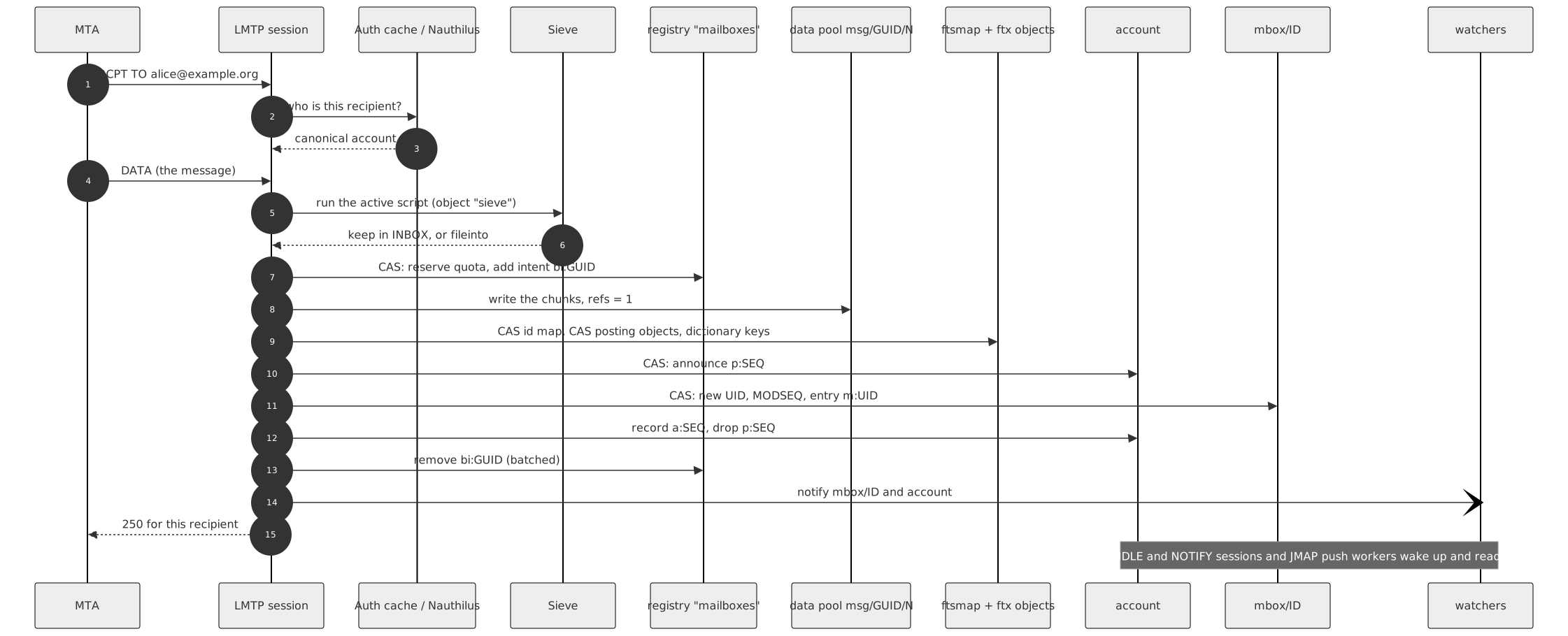
The MTA (the mail transfer agent in front, for example Postfix) hands the message to ShardPost over LMTP (the local variant of SMTP).
- Who is the recipient? The LMTP session asks the auth cache, which
asks Nauthilus (the authentication service) on a miss, for the canonical account (here
alice@example.org). An unknown recipient is refused before the message is even sent. - Sieve. The session reads the account's
sieveobject and runs the active script (plus global scripts). The result is a list of actions: keep in INBOX,fileintoother mailboxes, redirect, vacation. If the message goes into several mailboxes, a delivery intent (d:in the registry) is written first, naming each target and GUID. - Reserve. One CAS on the registry: check the quota, add the size to
q:bytesand 1 toq:msgs, and in the same write add the intentbi:<guid>("a blob is about to be written"). Over quota: LMTP answers552 5.2.2 Mailbox full. - Write the blob. The chunks
msg/<guid>/0..ngo into the data pool, withrefs = 1andlenon chunk 0. - Index the text. One CAS on
ftsmapallocates the document id, then one CAS per posting object the message's terms fall into, then the dictionary keys of new terms (plain writes: setting a key twice changes nothing). - Announce the change in the account log:
p:<seq>onaccount. - Link. A CAS on the mailbox object: allocate the next UID and
MODSEQ, write the entry
m:<uid>(on shard 0 in the same CAS; on a higher shard in two phases, see storage.md). - Record the change:
a:<seq>replacesp:<seq>. - Clean up. The intent
bi:<guid>is removed, batched with the next registry write where possible. - Wake the watchers. A notify on
mbox/<id>and onaccountwakes IDLE sessions, NOTIFY sessions and JMAP push workers on any server. - Answer.
250for this recipient.
The order is the point: the blob is written before the entry that
points at it, so no client ever sees an entry without data. If anything
fails before the link, the session gives back the quota and deletes the
blob. If the process dies in the middle, the intents tell the scrubber
what to clean (chapter 5.5). Any storage error is answered
451 4.3.0 Temporary storage failure, so the MTA retries.
What it costs: in layout 3 with one object of each kind, about 21 RADOS
operations per delivery (10.3 reads, 10.4 writes, TestHotPathOps on the
test cluster, storage.md); the
bench measured 24.2 (0.45.0 report).
In layout 2 it was 245.6, of which the full-text index made 225
(R4 measurement). The
full-text part of a layout 3 delivery is about 2·S + D + 1 operations
(S posting objects, D dictionary objects), so a large, resharded account
pays more per delivery than a small one.
4.2 A client reads and searches
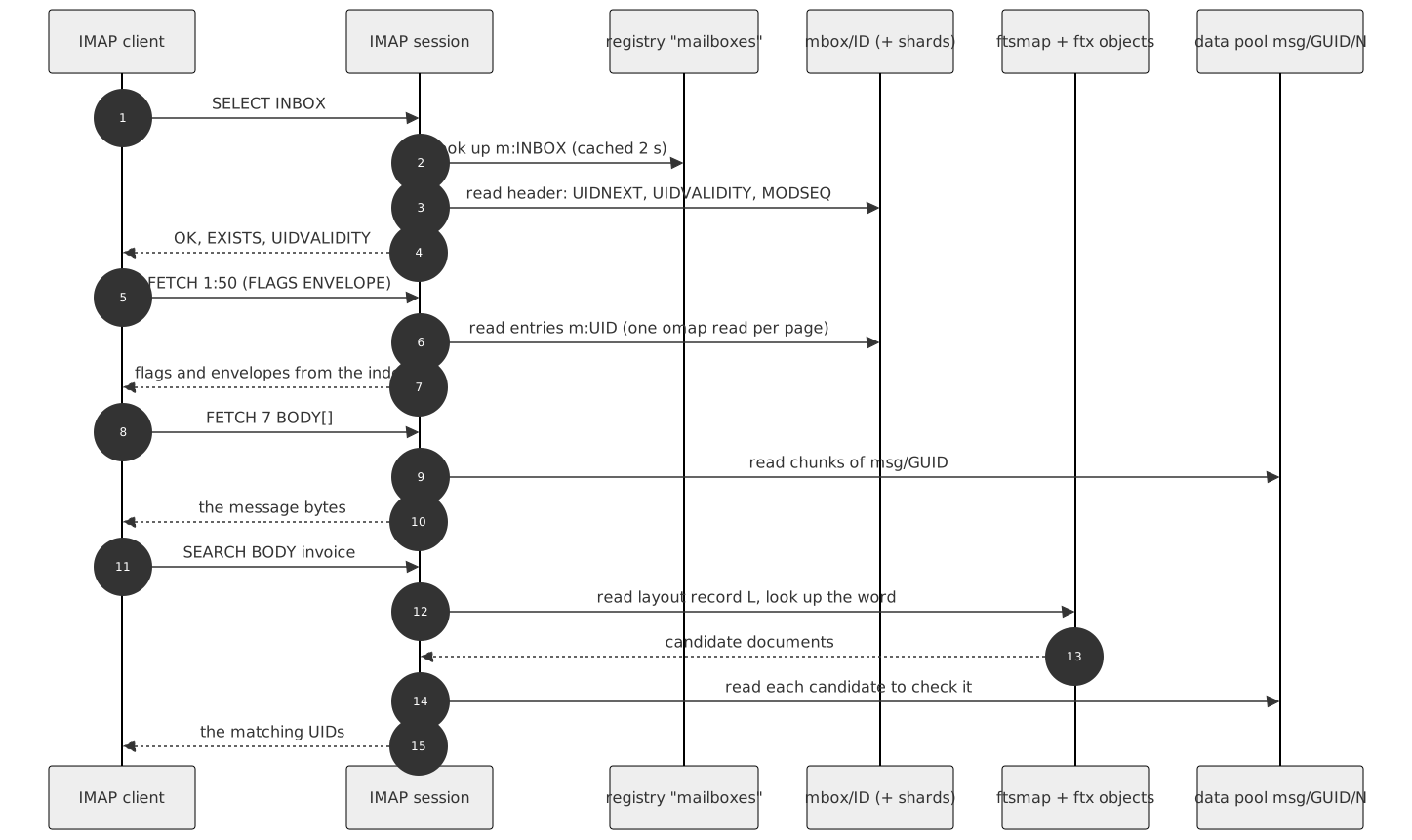
- Opening the account costs nothing in Ceph by itself (
Store.User()sends no operation); the account, its mailbox list and the INBOX state cost 4 reads (R4 measurement). - SELECT reads the registry key of the name (cached for two seconds)
and the header keys of
mbox/<id>. - FETCH of flags or envelopes reads only entries
m:<uid>from the index: the envelope and preview are stored in the entry. A FETCH of the body reads the chunks from the data pool. - SEARCH of text asks the full-text index for candidates: the
layout record
Lnames the generation, the dictionary and posting objects give the documents that may contain the words. By default (fts.imap_search: substring) every candidate is then checked against the stored header text or the message itself, because IMAP requires exact substring matches. JMAP and the admin search use the index alone. Details: Notifications and search. - IDLE watches
mbox/<id>; NOTIFY watchesaccount. All sessions of one server share one RADOS watch per object (the watch hub), so a thousand sessions on INBOX of one account cost one watch.
4.3 Copy, move and expunge
COPY inside the account: one new entry in the target mailbox and
refs + 1 on the blob (a CAS on the xattr of msg/<guid>/0). No bytes
are copied. A copy into another account writes a new blob in that
account's namespace: blobs never cross namespaces.
MOVE is copy-then-remove with a safety net: a MOVE intent i: on the
source mailbox, refs raised for the moment, the target linked, the
source entry removed, the extra reference released. The net reference
count is unchanged. A crash leaves the intent for the scrub.
EXPUNGE removes entries and gives the blob back:
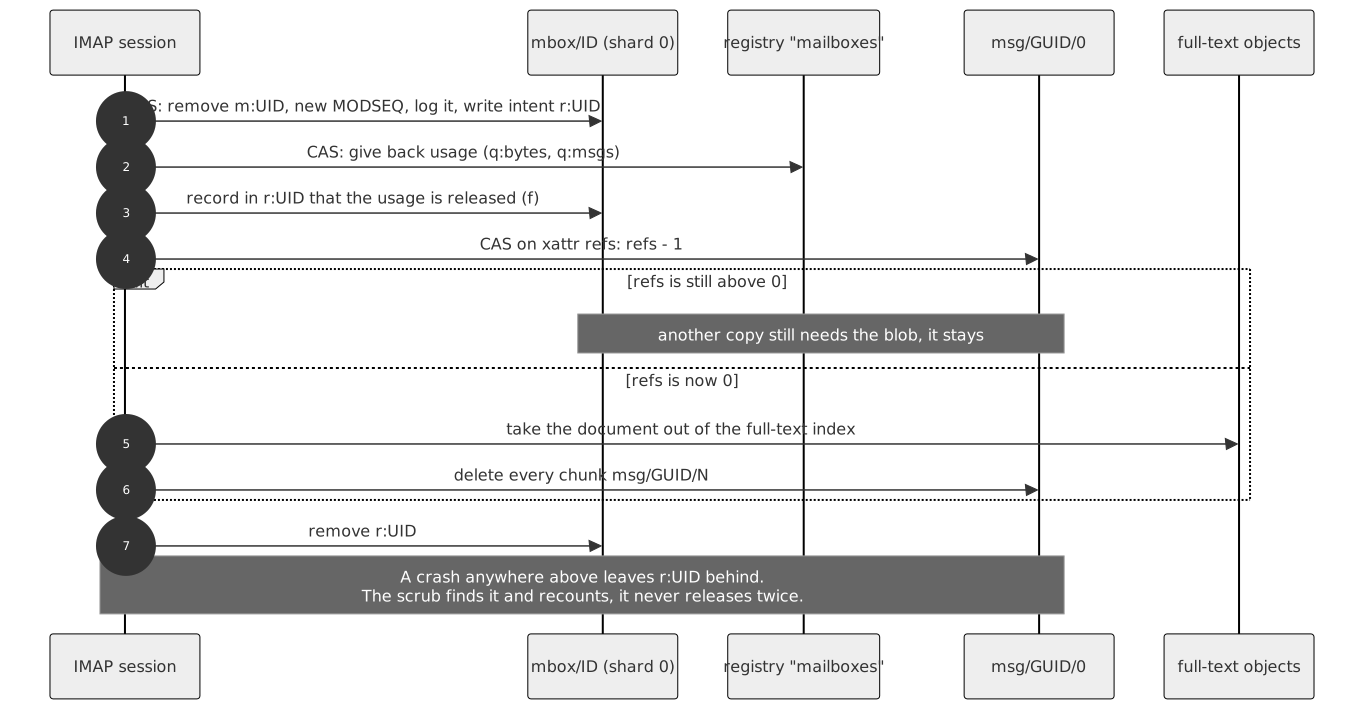
- A CAS on shard 0 removes the entry, raises the MODSEQ, logs the
change and writes the removal intent
r:<uid>(with GUID, size and chunk count). - A CAS on the registry gives the usage back (
q:bytes,q:msgs). - One write records in
r:<uid>that the usage is released (fieldf). - A CAS on the
refsxattr lowers it by one. - Only when
refsreaches 0: the document leaves the full-text index and every chunk is deleted. r:<uid>is removed.
A crash between these steps leaves r:<uid>. The scrubber never
"releases again" (that could take a blob away from a copy in another
mailbox); it recounts every reference instead
(storage.md).
\Deleted, a Trash mailbox and physical deletion are three different
things: only EXPUNGE (or the expunge job) removes data, and it is
gone. There is no recycle bin in the store.
4.4 A mailbox is deleted
IMAP DELETE (or the mailbox_delete job for big trees):
- one CAS on the registry removes the name and writes the tombstone
dm:<id>(with UIDNEXT and the shard size); - the header of shard 0 is retired (
h:uidnextset to 0, the old value kept), so a delivery that looked the mailbox up a moment ago can no longer add a message; - every entry's blob reference is released, the usage given back;
- the shards are deleted, highest first, shard 0 last; then the tombstone goes.
Because of the tombstone, a crash in the middle is finished by the
scrub. With the cluster mark mailbox/lock (0.52.0) the job locks only
the mailboxes it removes instead of the whole account
(Online quota recount and the mailbox lock).
4.5 Login, briefly
A login is mostly not a Ceph event. The protocol asks the auth cache;
on a miss the cache asks Nauthilus. The cache keeps an answer for
auth.cache.ttl (30 s), lookups for LMTP for auth.cache.lookup_ttl
(30 s). The only shared state in Ceph is the flush log auth-flush in
~admin: shardpostctl auth flush <account> writes it, and every server
watches it and drops its cached entries. After a successful login the
session opens the account (chapter 4.2). See
Auth cache.
In short. Delivery: reserve with an intent, write the blob, index the text, link the entry, record the change, notify. Reading: registry → mailbox → entry → blob. Search: index candidates, then a check. COPY raises a reference count, EXPUNGE lowers it, the last reference deletes the bytes. Every multi-step change leaves an intent behind if it dies.
5. Many servers, no central database
This chapter covers how many ShardPost processes can change the same account at the same time without a database server, why a crash never leaves a broken account, and which mechanisms do it.

5.1 Compare-and-swap on one object
RADOS makes one object change atomic. ShardPost builds every shared counter on that:
- read the keys and the object version;
- compute the new value (UIDNEXT + 1,
q:bytes+ size, …); - write it with assert version: "only if the object is still at that version";
- if somebody else wrote in between, the write fails; read again and decide again.
Two deliveries to alice's INBOX on two servers can both read UIDNEXT 43;
one wins and writes 43, the other fails, re-reads 44 and writes 44. No
UID is ever given twice. A writer that loses waits a random 1 to 10 ms
times the rounds it lost and gives up after 16 rounds. Every lost round
is counted in imapceph_rados_cas_retries_total{kind,class}.
5.2 Two objects: announce, write, record
CAS works for one object. A change that spans two objects — a higher
mailbox shard and its header, or the mailbox and the account log — is
done in phases: first announce it in one object (p:<seq> in
account, a pending record in the header), then write, then record
and drop the announcement. Readers never move past an announcement that
has no record yet, so a JMAP state token or an IMAP MODSEQ never skips a
change that is still being written. An announcement whose writer died is
turned into a partial entry after 60 seconds
(The account change log).
5.3 Watch and notify: wake-ups, not messages
A watch is a doorbell, not a letter. The writer rings, the watcher looks for itself. If a notify is lost, nothing is lost: the client sees the change at its next command, and NOTIFY sessions also read the account log every 60 seconds on their own. Watches in use:
| Object | Who watches | Who notifies |
|---|---|---|
mbox/<id> |
IMAP IDLE (selected mailbox) | every write to the mailbox |
account |
IMAP NOTIFY, JMAP push workers | every account log record |
auth-flush (~admin) |
every server | shardpostctl auth flush |
shard 0 of ix.jobs/claimable |
job runners | a new job, a release at shutdown |
| shard 0 of the learning and submission queues | their workers | a new entry |
imapceph_imap_watches{object} and imapceph_imap_watch_rearms_total
show the watches of a server.
5.4 Locks and leases
Some work must run on exactly one process at a time.
cls_lockis a lock that lives in the OSD, on an object, with a time to live. The holder renews it; if the holder dies, the lock expires. Used by the store-wide workers (the job expiry worker onix.jobs/expiry/lock, the learning worker onmbox/learning-worker, the delayed submission partitions, the 64 JMAP push partitionsix.jmap/push/p<nn>/lock), the backfills, the sweep, and the POP3 maildrop lock (lockmaildropon the INBOX object).- Leases in records. A job record carries its lease (
Lease.Gen,Lease.Until); a runner claims it by CAS on the record and renews it with heartbeats. A runner that dies loses the lease, and another takes the job over from its last checkpoint. - The account lock is a key in the account's registry. Imports and
exclusive jobs (
purge, offlinefts_rebuild, …) take it. While it is held, IMAP and POP3 answer "Mailbox maintenance in progress", LMTP answers451 4.2.1, and open sessions are disconnected within five seconds (shardpostctl-job(1)).
A lock is advisory: the CAS on the data is always the final fence. If a lock is lost at the wrong moment, the CAS still refuses a stale write.
5.5 Intents: why a crash leaves nothing broken
Between two writes to two objects, a process can die. Without care, that leaves a blob nobody points at, or a mailbox object without a name. ShardPost therefore follows one rule: before a write that could leave debris, it records an intent in an object the scrub reads anyway, and removes it after the write.
| Intent | Where | Says |
|---|---|---|
bi:<guid> |
registry | a blob is being written for a delivery, APPEND, Sieve fileinto, COPY into another account |
ci:<id> |
registry | a mailbox object is being created |
dm:<id> |
registry | a mailbox is being deleted (tombstone) |
d:… |
registry | a delivery to several mailboxes is running |
i:… |
mailbox shard 0 | a MOVE is running |
r:<uid> |
mailbox shard 0 | an entry was removed, its blob reference not yet released |
up:, sub:, bimp:, qi:, ps: |
registry | a JMAP upload, a delayed submission copy, an import step, a quota-relevant COPY/MOVE/rename, private \Seen marks of a public folder |
An intent older than scrub.intent_grace_seconds (3600 s) belongs to a
write that will not finish. The scrub settles it against what the
account's index actually says: a referenced blob is fine, an
unreferenced old one is deleted, references are recounted rather than
released twice. The full table is in
storage.md.
Intents use the writer's clock. All servers need NTP: a clock that is behind by more than the grace period could make the scrub take a running write for a crash.
In short. CAS on one object makes counters safe. Announce-write-record spans two objects. Watch/notify wakes people up, nothing more. Locks pick a single worker, leases move jobs between runners, the account lock keeps protocols out during maintenance. Intents turn every crash into a to-do list for the scrub.
6. The store-wide state
This chapter covers what lives outside the accounts, why it is organized as indexes and queues, and which processes use it.

6.1 Why indexes and queues
A server must not list a namespace to find work: a listing visits every PG of the pool (chapter 1.2). So everything that has to be found again is in a sorted index or a due queue:
- a sorted index
ix.<name>/headplusix.<name>/<nn>shard objects: one omap key per entry, the shard chosen by a hash of the id; - a due queue: keys
<due time>/<id>/<gen>, so a worker finds what is due by reading the first page of a few shard objects.
imapceph_rados_listings_total{site} counts the listings that remain,
by call site: a routine path that lists shows up there at once.
6.2 ~admin: the admin store
One object per record, kv.<key>:
| Record | What |
|---|---|
kv.job/<id>, kv.plan/<id>, kv.idem/<hash> |
maintenance jobs, their plans, idempotency keys |
kv.servers/<instance> |
registrations: every process that writes the store-wide state (servers, job runners, push pods, scrubs, sweeps, backfills; not the shardpost system tools) registers with role, version and capabilities and renews every minute; deleted 24 hours after the last heartbeat |
kv.fts/layout3, kv.fts/dictfilter, kv.fts/online, kv.quota/online, kv.mailbox/lock |
cluster marks: switches set by shardpostctl … enable -pods n once every running process reports the capability |
kv.jmap/push/acct/<account>, kv.jmap/push/seen/<account>, kv.jmap/push/lease |
JMAP push subscriptions and the push workers' state |
kv.jmap/sendq/<account>/<id> |
delayed JMAP submissions |
kv.fts_due/<account> |
the reshard job the fts_due worker planned |
Beside them: hint indexes (ix.job, ix.plan, ix.idem,
ix.jmap/push/acct, ix.servers), the due queues ix.jobs/claimable
and ix.jobs/expiry, the submission queue ix.submission, the push
partition locks, members and control objects, and auth-flush. With
admin.kv_index: read (the default, once shardpost index backfill kv
completed or shardpost system init set its marker) no running path
lists ~admin
(Admin store).
6.3 ~accounts: the account directory and queues
- The account directory
ix.accounts(256 shards): one entry per account that has a registry, withstate(activeorpurging) and the record of the last batch scrub. Batches over all accounts and the nightly scrub walk it instead of listing pools. The protocols write it once per account lifetime, when the registry is created; after that only a purge (the state) and the batch scrub (its record) change it. ix.uploads(expiring JMAP uploads),ix.purged(purged accounts for the sweep),ix.fts_layout(accounts with a layout 3 index),ix.fts_due(accounts waiting for a reshard).sweep/state,sweep/lock,sweep/<run>/…— a sweep in progress; these always stay in the index pool.
6.4 ~learning and ~server
~learning holds the learning queue: the copies learning/<id> in the
data pool (message plus job as xattr), and in the system (or index) pool
the due queue ix.learning, the owner index ix.learning/owner and the
worker lock on mbox/learning-worker. ~server holds one object,
metadata: the server METADATA entries.
In short. Store-wide state lives in four namespaces: ~admin (jobs,
marks, registrations, push and submission state), ~accounts (the
directory and queues), ~learning, ~server. Everything that has to be
found again sits in sorted indexes and due queues, so no running path
needs a listing.
7. Our programs and what they do to Ceph
This chapter covers every program and command that touches Ceph, what it reads and writes, how heavy it is, and when to use it.

7.1 Long-running processes
| Program | What it does | Touches in Ceph | Weight | When |
|---|---|---|---|---|
shardpost (no command: it serves) |
IMAP, POP3, LMTP, ManageSieve, JMAP, the admin API; also the background workers unless workers.run: false |
accounts in index and data; registration, auth flush, job queue writes, account directory entries; with workers also everything of shardpost runner |
the main load: per delivery about 21–25 operations in layout 3 | always |
shardpost runner (0.52.0) |
the background workers without listeners: job runner with the expiry and fts_due workers, upload expiry, delayed submission worker, learning worker |
job records and queues in ~admin, the directory and queues in ~accounts, ~learning; per job the accounts it works on |
follows the jobs; batches and reshards can be heavy | optional, for large clusters (Job runners) |
shardpost push |
JMAP Web Push: 64 partitions shared by the push pods | watches account objects of accounts with subscriptions, reads their logs; partition locks, members and kv.jmap/push/* |
one watch per watched account, reads per change | when JMAP push is offered; two or more pods |
7.2 One-shot commands of the server binary
These run with the server's image, configuration and Ceph credentials, usually as a Kubernetes Job or CronJob. They talk to Ceph directly, not through a server.
| Command | Reads / writes | Weight | When |
|---|---|---|---|
shardpost scrub --batch |
submits one batch job (scrub with skip_idle) to the admin store and exits; the job runners do the work |
the job: per account a few omap reads when idle, a full check otherwise; with scrub.orphan_source listing or shadow (the default) also a listing of the account's namespace in both pools |
nightly (the CronJob) |
shardpost scrub |
scrubs scrub.users, else every account of the directory, in its own process |
as above, but in one process | for chosen accounts |
shardpost scrub --sweep [--repair] [--restart] |
lists both pools in every namespace, spills names into ~accounts/sweep/…, compares with each account's data model; --repair deletes remnants older than scrub.grace_seconds |
heavy: a walk over every PG of both pools | once after upgrades that leave old debris, after purges with purge.listing: false; report first, then --repair |
shardpost index backfill accounts |
lists the index pool once, enters missing accounts into the directory, repairs entries | one listing plus one stat per account | once after the directory rollout, or to repair |
shardpost index backfill kv |
lists ~admin once, writes hint index and queue entries |
one listing of ~admin |
once after rollout; again when imapceph_kv_index_errors_total rises |
shardpost index backfill learning |
lists ~learning once, writes queue and owner entries |
one listing of ~learning |
once after rollout; again when its error counter rises |
shardpost index show kv / show learning |
reads the indexes and queues (read-only) | reads every queue entry | diagnosis |
shardpost system status / init / migrate / verify / abort / revert / cleanup |
the placement tools: fence, mark, copies of the four system namespaces, quarantine | init: small; migrate: copies every system object, in a window with every process stopped | once per cluster (shardpost-system(1)) |
shardpost bench populate / measure |
fills and measures bench pools of its own; refuses the production pools | heavy on the bench pools only | capacity planning (Bench) |
shardpost config check |
validates the configuration; no Ceph access | none | before every rollout |
7.3 shardpostctl
shardpostctl never talks to Ceph. It calls the admin API of a server
(Unix socket in the pod, or mutual TLS) and the server does the work.
The main command groups and their effect on storage:
| Group | Typical commands | Effect on Ceph |
|---|---|---|
server |
server list |
reads registrations |
account |
account show, account list, account directory, account repair |
reads the directory and registry; repair fixes a directory entry |
quota |
quota show, quota online status|enable|disable |
reads the usage; online reads registrations and sets the cluster mark quota/online |
mailbox, acl, shared, messages, search, message, flags, copy, move, sieve |
list, create, rename, subscribe; ACLs; read, search, flag, copy and move messages; Sieve scripts | the same reads and writes as IMAP would do |
plan, apply, check, job |
plan a job, run it, watch it | writes plan and job records; the job does the work (7.4) |
learning |
inspect and retry learning jobs | the learning queue |
export, archive verify, restore |
stream an account into an archive, check it, import it back | export: reads every message; restore: an import under the account lock |
migrate |
copy an account from another IMAP server, keeping UIDs | writes like a delivery, in batches, under the account lock; may reshard the full-text index between batches |
deliver |
deliver one message like an LDA | one delivery |
auth flush |
flush the auth cache | one write to auth-flush |
fts |
fts layout3|dictfilter|online status|enable|disable, fts layout show|clear, fts layout3 list, fts stats |
marks and reads; fts stats reads S + 1 objects, -exact reads every index object |
trace, submission |
protocol trace, delayed submissions | small records |
Each group has a manual page under docs/man/man1/.
7.4 The jobs
Jobs are records in ~admin; job runners claim and run them; a plan
computed first is applied once (shardpostctl-job(1)).
"Locks" means the account lock of chapter 5.4: deliveries get 451
for the duration.
| Kind | What it does in Ceph | Locks | Weight | When |
|---|---|---|---|---|
index_check |
reads the account's index objects and reports findings; repairs nothing | no | reads per mailbox | diagnosis (shardpostctl check) |
scrub |
checks and repairs references, intents, quota, orphans | no (repairs under a scrub mark) | per account: omap reads, plus listings unless scrub.orphan_source: intents |
nightly as a batch; per account after trouble (plan scrub <account>, apply) |
quota_recalc |
counts the usage from the index and writes q:bytes/q:msgs |
offline yes; online no (mark quota/online) |
reads every entry | after quota drift |
acl_reconcile |
writes or removes share pointers | no | small | after ACL trouble |
fts_rebuild |
drops the full-text index and indexes every message again | offline yes; online no (mark fts/online) |
reads every message | to change the text preparation, after a damaged index |
fts_layout |
converts layout 2 ↔ 3 or reshards a layout 3 index (copies the postings) | offline yes; online no | reads and writes the whole index of the account | reshards (usually by the fts_due worker), conversion |
fts_dict_convert |
rewrites a pre-0.35.0 layout 2 dictionary (legacy) | no | index of the account | only for old layout 2 indexes |
attachment_backfill |
reads messages without an attachment flag and records it | no | reads those messages | once for old messages (JMAP) |
mailbox_name_convert |
renames mailboxes stored in modified UTF-7 | yes | small | once for old accounts |
mailbox_delete |
deletes a mailbox tree (chapter 4.4) | offline the account; with mark mailbox/lock only the mailboxes |
releases every blob of the tree | large mailbox trees |
expunge |
removes chosen messages (at most 40 000 per plan) | no | per message as EXPUNGE | bulk clean-up |
purge |
deletes every object of an account, removes it from the directory | yes | deletes everything; with purge.listing: true (default) also lists the namespace in both pools |
account deletion |
batch |
runs index_check, scrub, fts_rebuild, attachment_backfill, fts_layout or quota_recalc on every account of the directory |
per kind | jobs.batch_parallel accounts at a time (scrub.parallel for scrub) |
shardpostctl plan -all |
Export, restore and import (migrate) are not job kinds: they are
admin API operations that stream to or from the caller. Restore and
import hold the account lock while they run.
In short. Three long-running programs (shardpost, runner, push)
carry the daily load. One-shot commands scrub, sweep, backfill and move
the placement. shardpostctl only talks to the admin API. Jobs are the
way to do long or dangerous work; the ones that lock an account make its
deliveries wait.
8. The operator's job
This chapter covers what to look at daily and weekly, and what to do — and what it does to storage — when something specific happens.
8.1 Daily
ceph -s:HEALTH_OK, all PGsactive+clean.- Last night's batch scrub:
shardpostctl job list -state running(nothing hanging), the result of the last batch (shardpostctl job show <id>):failedandfindingscounts, the first 50 accounts named.imapceph_batch_accounts_total{kind="scrub"}shows how many accounts wereskippedas idle. - Delivery health: the rate of
imapceph_lmtp_deliveries_totalby outcome; LMTP log linesdelivery deferred, account locked. shardpostctl server list: every pod registered with the expected version and role.
Effect on storage: none; these are reads.
8.2 Weekly
ceph dfandceph osd df: growth of each pool, the fullest OSD.ceph health detailforLARGE_OMAP_OBJECTS(it appears after deep scrubs).imapceph_fts_shards_capped_totalandimapceph_fts_reshard_due_total: are large accounts growing past their full-text caps?imapceph_rados_listings_total{site}: flat for the routine sites.- Backups: an export of chosen accounts, and
archive verifyof an older archive (8.3.12).
8.3 When X happens

8.3.1 A rollout (new image)
Follow the release procedure:
config check, image pinned by digest, rolling update, smoke test.
Read the release report for steps after the rollout (a backfill, a
cluster mark). A version that does not know a configuration key refuses
to start, so new keys go into the overlay after the image, and out
before a rollback.
Effect on storage: a rolling update restarts sessions; each new pod
registers in ~admin. Releases that change persistent formats say so;
an older image is then not a sufficient rollback
(Rollback).
8.3.2 Enabling a cluster mark
The marks fts/layout3, fts/dictfilter, fts/online, quota/online
and mailbox/lock switch on behaviour that older servers do not
understand. The pattern is always the same:
- the new version on every pod; wait three minutes (a pod that crashed leaves a registration that counts as fresh for that long; one that ended in order does not);
shardpostctl <group> status— every fresh pod reports the capability;shardpostctl <group> enable -pods <number of running pods>; it refuses when the count does not match.
Effect on storage: one record in ~admin. What follows can be heavy:
after fts/layout3, new indexes are layout 3 and existing accounts can
be converted (plan -all -layout 3 fts_layout), each conversion
rewriting the account's index.
8.3.3 Scaling
- More front-ends (servers): more sessions and watches; no change to the data. Each pod registers.
- Job runners: add the
runnercomponent first, then switch the servers toWORKERS_RUN=false; the way back in reverse (Job runners). Watchimapceph_job_claim_wait_seconds. - Push pods: about
1.3 × accounts with push / jmap.push.max_watched_accounts, at least two; each scaling moves partitions (Push partitions). - More OSDs: Ceph rebalances PGs (backfill). Expect higher latency
while it runs; do not start migrations or sweeps at the same time. A
change of a pool's
pg_nummakes a running sweep list that pool again.
8.3.4 An OSD or pool gets full
Ceph's defaults: nearfull at 85 %, backfillfull at 90 %, full at
95 % of an OSD (mon_osd_nearfull_ratio, mon_osd_backfillfull_ratio,
mon_osd_full_ratio; Ceph defaults, check your cluster). At full,
Ceph stops writes. ShardPost then cannot deliver: a write waits up to
the OSD operation timeout (rados_osd_op_timeout, set to 60 s by the
server) and fails, LMTP answers 451, the MTA queues and retries.
Reads keep working.
What to do: add capacity first. Expunging mail frees space only when the last reference to a blob goes, and deleting is itself a write. Watch the data pool and the index pool separately — they are on different devices.
8.3.5 LARGE_OMAP_OBJECTS
ceph health detailnames the pool. The OSD writes a "Large omap object found" line with the object and its key count to the cluster log; find it there.- Map the object name to its class (chapter 3):
ftx/<gen>/d<j>orp<i>orh<k>: a full-text index outgrew its objects. Normally thefts_dueworker reshards before (it plans at once fromfts.reshard_urgent_factor= 1.8 × the target). If the account is at a cap,imapceph_fts_shards_capped_total{kind}rose: raisefts.dict_shards_max(dictionary) orfts.shards_max(postings, headers), restart the pods, thenshardpostctl plan -due-only fts_layout <account>andapply -waitat a quiet time.fts/<nn>orftst/<nnn>: a layout 2 index; convert the account to layout 3.ix.*in~accountsor~admin: a store-wide index; report it.
- Run a deep scrub of the pool (
ceph osd pool deep-scrub shardpost-index); the warning clears when Ceph has seen the smaller objects. This is what happened in the dictionary V0 report.
Effect on storage: a reshard writes a new generation beside the old
one and deletes the old one after the switch; for a while the account
has two indexes. Offline, the account is locked for the job (minutes for
a large account); online (mark fts/online, and -online in the plan or
fts.online_build: auto) it is not.
8.3.6 Slow operations (SLOW_OPS)
Ceph reports operations that take longer than osd_op_complaint_time
(30 s, a Ceph default). Find the OSD (ceph health detail, ceph osd perf), check the disk and the network. On the ShardPost side,
imapceph_rados_op_seconds{op} rises and so do 451 answers. Pause
heavy maintenance (batches, sweeps, reshards) until the cluster is
healthy. imapceph_rados_inflight_ops near the objecter limit
(objecter_inflight_ops, 1024 by default) means a pod waits in its own
client, which Ceph does not see.
8.3.7 Key rotation
With Rook, a rotated cephx key needs no restart: the server opens a new connection, moves its long-lived views and worker locks to it, and lets running requests finish on the old one (a rotation can take up to 60 s per held lock). On native hosts, create a second identity with the same caps, switch the nodes one by one, then remove the old one (Key rotation).
Effect on storage: watches are set up again
(imapceph_imap_watch_rearms_total bursts once), worker locks move.
8.3.8 The nightly scrub
The CronJob (or a systemd timer) runs shardpost scrub --batch, which
only submits a batch job; the job runners do the work with
scrub.parallel accounts at a time. Accounts that did not change since
a clean scrub are skipped for up to scrub.interval_days (7). A scrub
still running from the night before is not started twice.
Effect on storage: mostly omap reads; per account not skipped also a
listing of its namespace in both pools while scrub.orphan_source is
shadow (the default) or listing. The switch to intents removes
those listings once every server runs 0.42.0 or later and the shadow
differences orphan_extra stayed 0
(Scrub without listings).
8.3.9 The reshard window
fts.reshard_window (e.g. "02:00-05:00", with
fts.reshard_window_tz) keeps the fts_due worker's reshards and the
batches of fts_layout/fts_rebuild in a quiet time. Empty means
always. An account whose largest object reaches 1.8 times its target is
resharded at once, window or not.
Effect on storage: with a window, at most fts.build_max_running (1)
of the worker's reshards run at a time (an urgent one does not wait for
that), each building a second generation of one account's index.
8.3.10 Moving the store-wide state to a system pool
For an existing cluster: shardpost system migrate --to shardpost-system in a maintenance window with every process stopped
(the cutover of the test cluster took about two minutes of downtime,
report). The tool copies every object of the four system
namespaces, checks digests, moves the originals into a quarantine
(<namespace>.moved/<run> in the index pool), writes the mark and the
fence. Then ceph.system_pool is set on every process and they start
again. The exact runbook, exit codes and ways back (abort, revert):
Moving the store-wide state.
Effect on storage: every object of the four system namespaces is copied (238 on the test cluster); after the migration no image before 0.47.0 may run.
8.3.11 Quarantine clean-up
Seven days or more after a migration, and with the owner's consent:
shardpost system cleanup --run <run> --confirm <run>. It deletes the
quarantine; the fence and the poisoned index heads stay for good.
8.3.12 Backups and exports
shardpostctl export -o <file> <account> streams an account into an
archive (messages with UIDs, flags, MODSEQs, Sieve scripts; not the
full-text index, which is rebuilt). shardpostctl archive verify <file>
checks it without a server; shardpostctl restore -account <test account> <file> proves it without touching the original. The
scrub is not a backup: a lost blob cannot be rebuilt from its entry.
A backup of the cluster as a whole has to cover both pools and the
store-wide state
(Scrub, backup and observability).
Effect on storage: an export reads every message of the account; a restore writes like an import, under the account lock.
In short. Daily: health, the night's scrub, deliveries, registrations. Weekly: capacity, large omap, full-text caps, listings, a backup test. Everything that changes behaviour cluster-wide goes in the same order: image everywhere, wait, check, then switch. Heavy work (reshards, batches, sweeps, migrations) belongs in quiet times and never while Ceph is unhealthy.
9. Monitoring
This chapter covers which ShardPost metrics and which Ceph signals to watch, what normal looks like, which values mean trouble, and what to do.

Read the layers from the top: what users feel, how the store talks to
Ceph, what the background work does, and Ceph itself. A problem at the
top usually has its cause one or two layers below. Metrics come from
/metrics on server.http_addr (default :8080); the full list with
caveats is in Observability. Missing series are
not zero: many series appear only with their first event.
9.1 ShardPost metrics
"Normal" and "trouble" below are the reference docs' alert rules where they exist (Observability, Operations); otherwise they are guidance for reading the trend, not measured thresholds.
| Metric | Normal | Trouble | What to do |
|---|---|---|---|
imapceph_lmtp_deliveries_total{outcome} |
failures a small share | failures rising | LMTP log: account locked, quota, storage errors |
imapceph_command_seconds |
stable quantiles | rising latency | compare with imapceph_rados_op_seconds |
imapceph_rados_op_seconds{op} |
milliseconds | seconds | Ceph latency: ceph osd perf, slow ops |
imapceph_rados_inflight_ops |
far below objecter_inflight_ops |
near it | the pod waits in its client: raise the throttle or add pods |
imapceph_rados_cas_retries_total{kind,class} |
low and steady | rising on one class |
contention: many writers on one account (fts, registry, mbox) |
imapceph_rados_listings_total{site} |
flat for routine sites | a routine site rising | a mode not effective: run the backfill, check admin.kv_index, scrub.orphan_source |
imapceph_system_placement{state} |
1 for the configured placement | unknown 1 |
Ceph cannot be read; see placement messages |
imapceph_kv_index_errors_total{collection} |
0 | above 0 | run shardpost index backfill kv (or learning) |
imapceph_queue_stale_entries_total{queue,action} |
rare | steady rescheduled |
writers fail between two writes: look for crashes |
imapceph_job_claim_wait_seconds |
short | long waits | more runner slots (jobs.max_parallel, runners) |
imapceph_batch_accounts_total{kind,outcome} |
mostly done/skipped |
failed |
read the batch result |
imapceph_scrub_findings_total{kind} |
few | rising | read the scrub results per account |
imapceph_scrub_shadow_differences_total{kind} |
orphan_extra 0 |
orphan_extra above 0 |
do not switch to intents |
imapceph_fts_shards_capped_total{kind} |
0 | above 0 | raise the cap, reshard (8.3.5) |
imapceph_fts_shard_missing_total |
0 | above 0 | shardpostctl plan fts_rebuild <account> |
imapceph_fts_frozen_waits_total{result} |
timeout only during conversions |
timeout outside one |
shardpostctl fts layout show <account>, then clear |
imapceph_fts_build_runs_total{mode,result} |
ok, busy |
error |
an online run did not switch: read the job |
imapceph_quota_recount_runs_total{mode,result,reason} |
ok, busy |
error |
read the job |
imapceph_quota_recount_dead_intents_total |
0 | above 0 | a crash or a hanging operation: look for the intent in the registry |
imapceph_imap_watch_rearms_total |
bursts after a key rotation | a steady rate | OSD drops watches: check Ceph |
imapceph_auth_cache_total{op,result} |
high hit share |
miss rising |
load on Nauthilus |
imapceph_jmap_push_partitions_unowned |
0 | above 0 for two minutes | push pods without capacity or disagreeing clocks |
imap_imapsieve_learning_lag_seconds |
minutes | rising for long | more learning concurrency |
9.2 Ceph signals
These are standard Ceph commands and health codes, not ShardPost's.
| Command or code | What it tells you | Normal | Trouble |
|---|---|---|---|
ceph -s |
overall health, PG summary, client I/O | HEALTH_OK, all PGs active+clean |
anything else |
ceph health detail |
the reasons for a warning | empty | read every line |
ceph df (ceph df detail) |
stored data and objects per pool | steady growth | sudden jumps (a reshard keeps two generations for a while) |
ceph osd df |
fill level per OSD | even, below nearfull | one OSD far above the others |
ceph osd pool stats |
client and recovery I/O per pool | — | recovery competing with clients |
ceph osd perf |
commit/apply latency per OSD | a few ms (the R4 run saw 4–5 ms) | one OSD much slower |
LARGE_OMAP_OBJECTS |
an object above 200 000 omap keys | absent | 8.3.5 |
SLOW_OPS |
operations older than 30 s | absent | 8.3.6 |
OSD_NEARFULL, POOL_NEARFULL, OSD_FULL |
capacity | absent | 8.3.4 |
PG states degraded, undersized, peering, backfilling |
recovery after a failure or a change | short-lived | long-lived: no heavy ShardPost maintenance until clean |
inconsistent PGs, scrub errors |
Ceph found differing copies | absent | Ceph's repair procedure, not ShardPost's scrub |
9.3 Logs worth an alert
event=system_placement_lost— a process read a placement that contradicts its configuration and ends.event=push_scan_listing— the push workers list~admin: runshardpost index backfill kv.admin.kv_index=read without a completed …at startup — the backfill marker is missing; the server behaves as inwritemode.delivery deferred, account locked (import or maintenance)— LMTP answered451because a job or import holds the account.
In short. Watch from the user down: deliveries and command latency,
then RADOS latency, retries and listings, then the background work, then
ceph -s. Most alerts that should be 0 are counters of things that must
not happen (index errors, missing full-text objects, dead intents,
orphan_extra).
10. Sizing rules of thumb
This chapter covers the numbers that help you estimate what an account costs and where the limits are. Each one says where it comes from; estimate means derived, not measured.
| Rule | Value | Source |
|---|---|---|
| RADOS operations per delivery, layout 3, small account | about 21 (TestHotPathOps), 24.2 in the bench |
storage.md, 0.45.0 report |
| RADOS operations per delivery, layout 2 | 245.6 (225 of them full-text) | R4 measurement |
| Full-text share of a layout 3 delivery | about 2·S + D + 1 operations |
storage.md |
| A large resharded account (S/D/H 32/128/1) | about 198 operations per delivery | dictionary V0 report |
| EXPUNGE of one message, layout 3 | 28.2 operations in the bench | 0.45.0 report |
| Opening an account with its mailbox list and INBOX | 4 reads | R4 measurement |
| Ceph's large omap threshold | 200 000 keys per object | Ceph default, used throughout the docs |
| Entries per mailbox object | at most 100 000 (server.mbox_shard_size) |
code default |
| Keys of mailbox shard 0 | up to 100 000 entries plus the change and vanished logs of the last 10 000 MODSEQs (LogRetention), header keys and intents: below 200 000 |
estimate from the code defaults |
| Full-text object target | 100 000 keys (fts.shard_target_keys, fts.dict_target_keys); queued for a reshard above 1.5×, resharded at once at 1.8× (with a window) |
code defaults, configuration |
| Full-text caps | 128 posting and header objects, 512 dictionary objects; beyond 12.8 million terms or 51.2 million dictionary keys per account the objects grow past their target | storage.md |
| Full-text keys per message on a large account | about 57 terms and 280 dictionary keys per message (36 246 messages measured); the sizing code continues with 63.5 and 311 per message beyond that | storage.md |
| Dictionary objects of an account of 100 000 messages | about 28–31 million keys → the cap of 512 objects, roughly 55 000–61 000 keys each | estimate from the per-message values above |
| Where large accounts hit the caps | dictionary above about 165 000–180 000 messages, postings above about 200 000–225 000 messages; Ceph's 200 000 keys per object comes later (dictionary at about 330 000–365 000 messages) | estimate; identifiers dominate the dictionary, the identifier filter (fts.dict_filter: ids) lowers it |
JMAP locator ix/<space>/<nn> |
32 shards: about 30 000 keys per object at a million messages | storage.md |
| Account directory | 256 shards: about 4 000 entries per shard at a million accounts | estimate (1 000 000 / 256) |
| Index pool objects per account, layout 3 | about 10–40 | Pool sizes |
| Index omap per account, layout 2, 50 messages | 292 objects, 75 590 keys, 1.1 MiB | R4 measurement |
| System pool at a million accounts | under 5 GB, about 600 hot objects | Pool sizes |
| Dictionary space on NVMe | 14–17 KB per message at 280 keys per message | estimate in storage.md |
| Erasure coding overhead | 1.5 in theory for 2+1; 1.58 measured with small blobs | R4 measurement |
| Message chunks | 4 MiB each (ceph.chunk_size) |
code default |
| librados memory per process | about 150 MiB, plus server.memory_budget_bytes |
Operations |
Large accounts (more than 100 000 messages). They are fine for the
mailbox objects: every 100 000 UIDs start a new shard. The full-text
index is what grows: it reshards itself up to its caps, a delivery
touches more objects (up to about 2·S + D + 1), and a reshard of such
an account takes minutes (3.5 minutes for 36 000 messages and 1.8 GB,
offline, operations). Use
the reshard window and online runs for them, and watch
imapceph_fts_shards_capped_total.
In short. A small layout 3 account costs about two dozen operations per delivery; the full-text index is what makes accounts expensive. Everything is sharded to stay below 200 000 keys per object; the full-text caps are where large accounts need attention.
11. Glossary
| Term | Meaning |
|---|---|
| Account directory | ix.accounts in ~accounts: one entry per account; batches walk it instead of listing pools |
| Account lock | a key in the registry that keeps protocols and other jobs out during an import or an exclusive job |
| Account log | the object account: the JMAP change log with the counter h:seq |
| Admin store | the records kv.<key> in ~admin: jobs, plans, marks, registrations, push and submission state |
| Batch | a job that runs one kind on every account of the directory |
| Blob | the bytes of one message, msg/<guid>/<n> in the data pool |
| CAS | compare-and-swap: read with version, write only if the version is unchanged |
| cephx | Ceph's authentication |
| Chunk | one object of a blob, 4 MiB by default |
cls_lock |
a lock kept by the OSD on an object, with a time to live |
| Cluster mark | a record in ~admin that switches on behaviour all servers must understand (fts/layout3, fts/dictfilter, fts/online, quota/online, mailbox/lock) |
| CRUSH | the algorithm that maps a PG to its OSDs |
| Deep scrub | Ceph's periodic check of all copies; also where large omap objects are found |
| Due queue | a sorted index keyed by due time, so a worker finds what is due without listing |
| Erasure coding (EC) | storing k data and m parity parts instead of full copies |
| Fence / mark | system.moved in the index pool and system.pool in the system pool: they say where the store-wide state lives |
| Generation | one complete layout 3 full-text index of an account, ftx/<gen>/…; a reshard builds a new one |
| GUID | 16 random bytes (32 hex digits) naming one stored message |
| Intent | a note written before a multi-object change and removed after it; a crash leaves it for the scrub |
| JMAP | the JSON-based mail protocol (RFC 8620/8621) for web and mobile clients |
| Layout 2 / 3 | the two object layouts of the full-text index |
| librados | the Ceph client library linked into shardpost |
| LMTP | the local mail transfer protocol: how the MTA hands messages to ShardPost |
| Listing | enumerating the objects of a namespace; visits every PG of the pool |
| Mailbox id | the stable id of a mailbox; names are only registry keys |
| MODSEQ | the per-mailbox change counter (CONDSTORE) |
| Monitor | the Ceph daemons that keep the cluster map and check cephx |
| MTA | mail transfer agent, for example Postfix: receives mail from the Internet and delivers it over LMTP |
| Namespace | a name prefix inside a pool; one per account |
| Nauthilus | the authentication service ShardPost asks for logins and recipient lookups |
| omap | the sorted key-value store attached to a RADOS object |
| OSD | the Ceph daemon that stores data on one disk |
| PG | placement group: objects are hashed to PGs, PGs placed on OSDs |
| Pool | a group of objects with one redundancy rule |
| Quarantine | after a system pool migration, the old objects kept as <namespace>.moved/<run> until cleanup |
| RADOS | Ceph's object store |
| Registry | the object mailboxes: names, ids, quota usage, intents |
| Registration | kv.servers/<instance>: a running process with version and capabilities |
| Reshard | building a full-text generation with more (or fewer) objects |
| Scrub (ShardPost) | the job that checks and repairs an account's references, intents and quota |
| Shard (mailbox) | mbox/<id>/<n>: the entries of 100 000 UIDs |
| Sieve | the users' filter rules (RFC 5228), run at delivery |
| Sweep | shardpost scrub --sweep: lists both pools to find what no account names |
| System pool | the optional pool for the store-wide state |
| UID, UIDVALIDITY | the IMAP identity of a message within a mailbox |
| Watch / notify | a RADOS wake-up signal on an object |
| xattr | a small named value on a RADOS object |
12. Where to read more
| Topic | Document |
|---|---|
| Every object, key and write order in detail | RADOS data model and consistency |
| The processes, interfaces and login/delivery sequences | Runtime and UML, Architecture |
| Rollouts, backfills, scrub, placement migration, native installs | Operations and releases |
| What an account costs, the bench | Bench |
| Every configuration key | Configuration |
| Metrics, traces and logs | Observability |
| Quota counters, rules, recounts | Quota |
| JMAP state, push partitions, delayed sending | JMAP |
| Commands, options, exit codes | the manual pages under docs/man/man1/: shardpostctl(1), shardpostctl-job(1), shardpostctl-fts(1), shardpostctl-account(1), shardpostctl-export(1), shardpost-scrub(1), shardpost-system(1), shardpost-bench(1) |
| Measurements behind the numbers | R4 measurement, 0.45.0, dictionary V0, system pool cutover |
| The diagrams of this guide | Diagrams (storage-guide-*.mmd) |
Rendered from docs/architecture/storage-guide.md in the ShardPost repository.